Hash Calculator
Help
Full guide
What is a hash (digest)?
A cryptographic hash function converts an input of any length into a fixed-length fingerprint. SHA-256 always produces 256 bits (64 hex characters), whether the input is empty, one word, or an entire disk image.
A secure hash function is defined by three properties:
- Preimage resistance — given a hash
h, it is computationally infeasible to find any inputmsuch thathash(m) = h. This is what makes the function "one-way". - Second-preimage resistance — given an input
m1, it is infeasible to find a different inputm2with the same hash. - Collision resistance — it is infeasible to find any two inputs
m1 ≠ m2that share a hash.
The practical behavior you see every day:
- Same input → same output (deterministic)
- Tiny input change → completely different output (the avalanche effect)
- Fixed output length regardless of input size
- No practical way to reverse the output back to the input
Note what is not on the list: hiding information. If the input is guessable, the hash offers zero protection — an attacker just hashes candidate inputs until one matches.
The avalanche effect, concretely
Hashing hello and Hello — one flipped bit of case — produces unrelated digests:
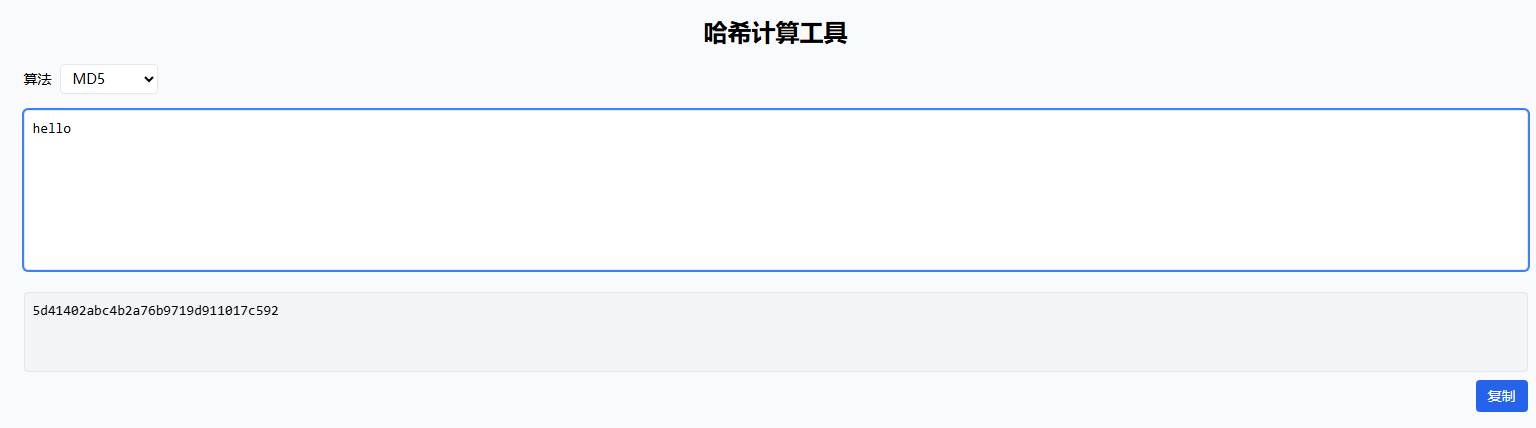
MD5("hello")     = 5d41402abc4b2a76b9719d911017c592
MD5("Hello")     = 8b1a9953c4611296a827abf8c47804d7

SHA-256("hello") = 2cf24dba5fb0a30e26e83b2ac5b9e29e1b161e5c1fa7425e73043362938b9824
SHA-256("Hello") = 185f8db32271fe25f561a6fc938b2e264306ec304eda518007d1764826381969
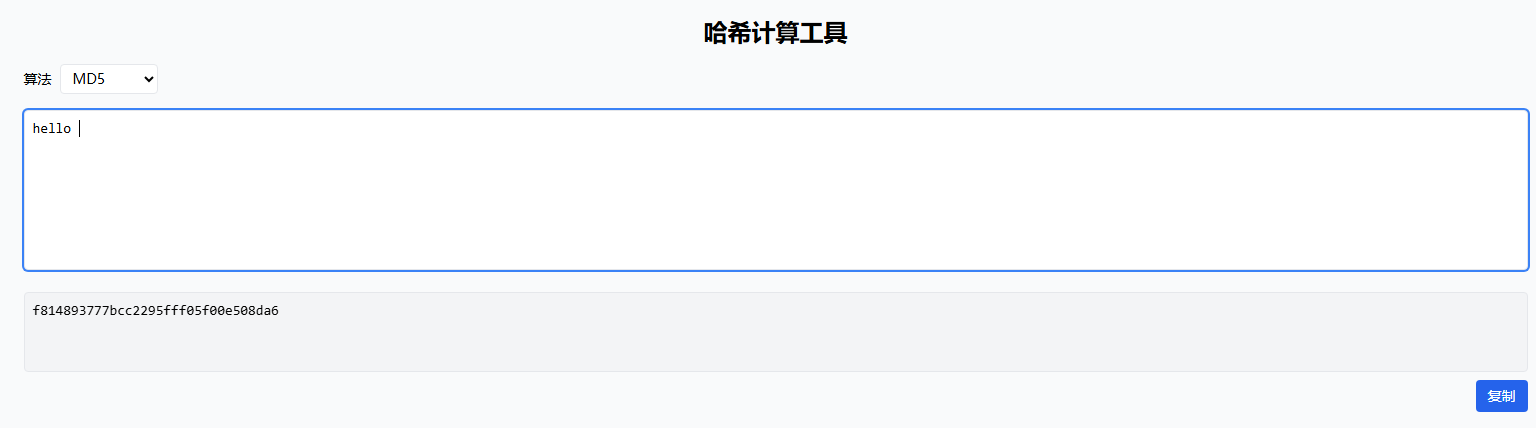
Roughly half of the 256 output bits flipped from a one-character change. This is why hidden whitespace, different newline styles (\n vs \r\n), or Unicode normalization differences make "identical-looking" text hash differently — the number one cause of checksum mismatch reports.
The algorithm landscape
| Algorithm | Digest size | Status | Appropriate use in 2026 |
|---|---|---|---|
| MD5 | 128 bits | Broken (collisions in seconds on commodity hardware) | Non-adversarial checksums, cache keys, dedup, ETags |
| SHA-1 | 160 bits | Broken (SHAttered attack, 2017; chosen-prefix collisions ~2020) | Legacy interop only |
| SHA-256 | 256 bits | Secure | Default choice: TLS, JWT, Git, Bitcoin, HMAC |
| SHA-384 / SHA-512 | 384 / 512 bits | Secure | Higher security margin; SHA-512 is often faster on 64-bit CPUs |
| SHA-3 / BLAKE3 | variable | Secure | Modern alternatives; SHA-3 is a different construction (Keccak sponge), immune to the class of attacks that broke SHA-1/MD5 |
"Broken" specifically means collision resistance is gone — attackers can craft two files with the same MD5/SHA-1. For verifying a download against a checksum published by the original author, MD5 still detects accidental corruption fine; what it no longer detects is an attacker who crafted both the file and the checksum. That is why security-sensitive verification moved to SHA-256.
Length extension is a subtler reason plain SHA-256(secret + message) must never be used as a signature: for Merkle–Damgård hashes (MD5, SHA-1, SHA-2), anyone who knows the hash of a message can compute the hash of that message plus arbitrary suffixes — without knowing the original content. This is exactly the vulnerability HMAC was designed to eliminate.
Hash vs HMAC vs password hashing
Three different jobs that all build on hash functions:
| Plain hash | HMAC | Password hashing (Argon2/bcrypt/scrypt) | |
|---|---|---|---|
| Keyed? | No | Yes (secret key) | Per-user salt |
| Speed | Fast | Fast | Deliberately slow + memory-hard |
| Proves | Content is X | Content came from key holder | Slow to brute-force even if DB leaks |
| Used for | Checksums, dedup, digests | API signatures, JWTs (HS256), Webhooks | Storing login credentials |
The SHA-256 of a password appears instantly in rainbow tables; even a salted fast hash falls to GPU rigs testing 10¹⁰+ candidates per second. Password hashing functions counter this with tunable CPU cost and (for Argon2/scrypt) memory cost, making each guess expensive by design.
When is a hash calculator useful?
- Verify downloads — compare your computed hash with the publisher's checksum
- Deduplicate content — identical inputs produce identical digests
- Integrity checks in pipelines — detect whether payloads changed between stages
- Request signing prep — HMAC-based API signatures (AWS Signature v4, webhook secrets) start from exact digests; this tool helps you confirm what your code is actually hashing
- Reproduce published examples —
SHA-256("hello")above lets you sanity-check any hash implementation
Examples
Example 1: Hash a simple string
Input hello with MD5 algorithm:
Example 2: Why whitespace matters
Input hello vs hello (with trailing space) — hashes are completely different:
Security notes (important)
- MD5 and SHA-1 are not recommended for security (practical collision attacks exist).
- A hash does not hide information. If the input is guessable (e.g. short passwords), attackers can brute-force it.
- Never use
hash(secret + data)as a signature — use HMAC, which is resistant to length-extension. - For passwords, use dedicated password hashing (Argon2id / scrypt / bcrypt) instead of MD5/SHA.
Troubleshooting
- If the result looks unexpected, check for:
- Hidden whitespace (spaces,
\n,\r\n) - Different casing (A vs a)
- Different normalization (e.g. Unicode characters — é can be one code point or
e+ combining accent) - Encoding: this tool hashes UTF-8 bytes; another tool hashing UTF-16 or Latin-1 bytes will disagree
- Hidden whitespace (spaces,
- Make sure you're hashing exactly the intended input text.
Related tools
- Base64 tool
- JWT decoder — see HMAC in action signing real tokens