YAML ⇆ JSON Converter – Bidirectional Online Tool
YAML Input
290 BJSON Output
Converted· 33 lines · 531 B
- Select conversion direction: YAML → JSON or JSON → YAML (switches automatically when you upload a .json / .yaml file)
- Paste content in the left input box, click "Upload", or drop a file onto the input box
- The result updates live on the right; adjust indent or enable "Sort keys"
- Click "Copy" or "Download" to save — downloads keep the original file name
Help
FAQ
What's the difference between YAML and JSON?ShowHide
YAML has simpler syntax, supports comments and multi-line strings. JSON is stricter, keys must be double-quoted, no comments. YAML is better for config files, JSON for data exchange.
What if conversion fails?ShowHide
The output panel shows the line, column and a code snippet of the error, with a hint about the cause. Common YAML issues: inconsistent indentation, tabs, missing space after a colon. Common JSON issues: unquoted keys, trailing commas, unclosed brackets.
What YAML features are supported?ShowHide
Anchors and aliases (&/*), merge keys (<<), flow style, and multiple documents separated by --- (combined into one JSON array). Language-specific tags such as !!python or !!ruby are not supported.
Will dates or yes/no values be changed?ShowHide
No. Dates like 2024-01-01 stay as plain strings instead of becoming timezone-shifted timestamps, and yes/no/on/off stay strings too. When converting JSON → YAML, strings that could be misread are quoted automatically.
Will formatting be lost?ShowHide
YAML → JSON loses comments and formatting (JSON doesn't support comments). Data is kept intact, except integers above 2^53 lose precision — the tool warns you, and quoting them in the source keeps them exact.
Is my data uploaded?ShowHide
No. All conversion happens locally in your browser. Nothing is uploaded to any server.
Quick Start
- Select conversion direction: YAML → JSON or JSON → YAML (switches automatically when you upload a .json / .yaml file)
- Paste content in the left input box, click "Upload", or drop a file onto the input box
- The result updates live on the right; adjust indent or enable "Sort keys"
- Click "Copy" or "Download" to save — downloads keep the original file name
Privacy Notice
Full guide
YAML ⇆ JSON Converter
What is YAML?
YAML (YAML Ain't Markup Language) is a human-readable data serialization format, commonly used for:
- Configuration files: Kubernetes, Docker Compose, GitHub Actions
- Data exchange: API request bodies, database import/export
- Documentation: Supports comments, multi-line strings
YAML vs JSON Comparison
| Feature | YAML | JSON |
|---|---|---|
| Comments | ✅ Supported | ❌ Not supported |
| Multi-line strings | ✅ Supported | ❌ Needs escaping |
| Key quotes | Optional | Required double quotes |
| Indentation | Strict requirement | No requirement |
| Parse speed | Slower | Faster |
Usage Examples
YAML → JSON Conversion
Convert YAML configuration files to JSON format:
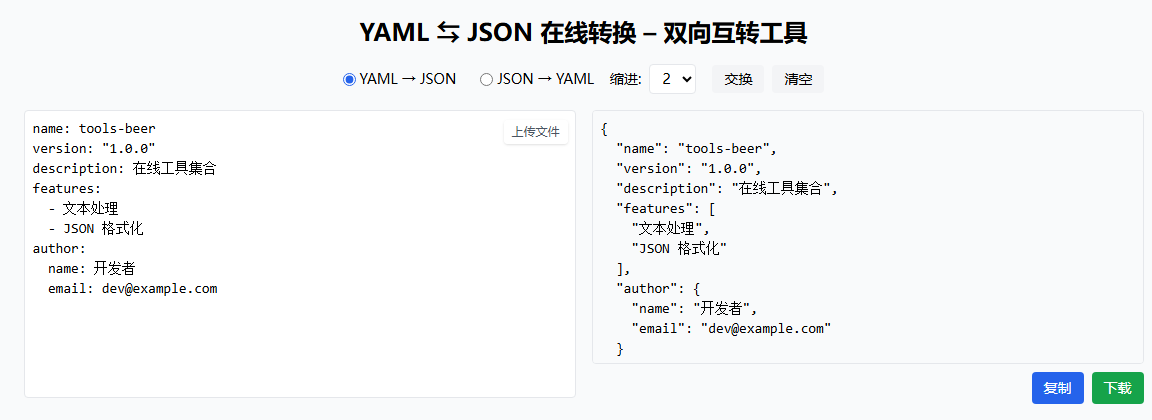
Enter YAML content on the left, formatted JSON is generated automatically on the right.
JSON → YAML Conversion
Convert JSON data to readable YAML configuration:
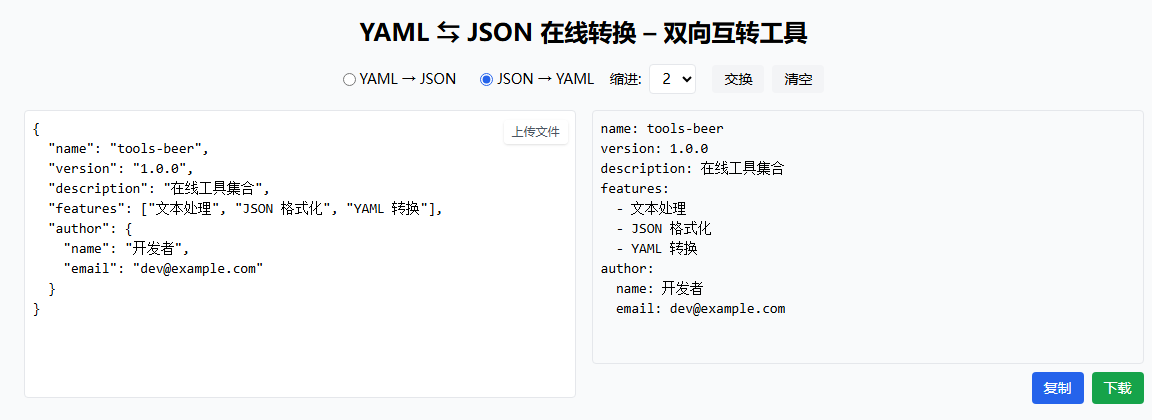
Supports custom indentation (2/4/8 spaces) for easier editing and maintenance.
Use Cases
YAML → JSON
- Convert Kubernetes configs to API request bodies
- Convert Docker Compose configs to JSON format
- Import YAML configs into JSON-based systems
JSON → YAML
- Convert API responses to readable config files
- Convert JSON configs to YAML for easier editing
- Generate GitHub Actions and other config files
Related Tools
- JSON Formatter - JSON formatting and minification
- JSON Compare - JSON diff comparison
- JSON ⇆ Go Struct - JSON and Go struct conversion